Class blog tips | Part 1 - distribution
 Micke Kring
·
Micke Kring
·

In this small tips article series I thought I’d share my experiences of blogs in school, mainly based on the work with this at Årstaskolan. Working with publishing, creating transparency in the organisation and getting a dialogue going about what happens in the classroom is great, but it also takes some work. It can also make things a lot easier. And in this first part I’ll write a bit about one of these things — distribution.
One in - Several out
So I can fit everything in that I want to, I’m constantly working to streamline and automate everything I can, so I can focus on what I think is important. All according to the age-old saying “ask not what you can do for your computer, ask what your computer can do for you”.
ask not what you can do for your computer, ask what your computer can do for you
We can do a lot with our blogs here. Take the old classic weekly newsletter as an example. With the blog the idea is that you publish your weekly newsletter. Done. One in. After that your readers — parents, relatives, pupils and others — can access this information in several ways. Several out. For example by receiving the newsletter via email, RSS, Facebook, Twitter and of course by visiting the blog. In addition, your readers can have the newsletter machine-translated into lots of languages and even read aloud. All this without you having to do anything. Now it’s time to walk through a few services to make this happen.
Overview
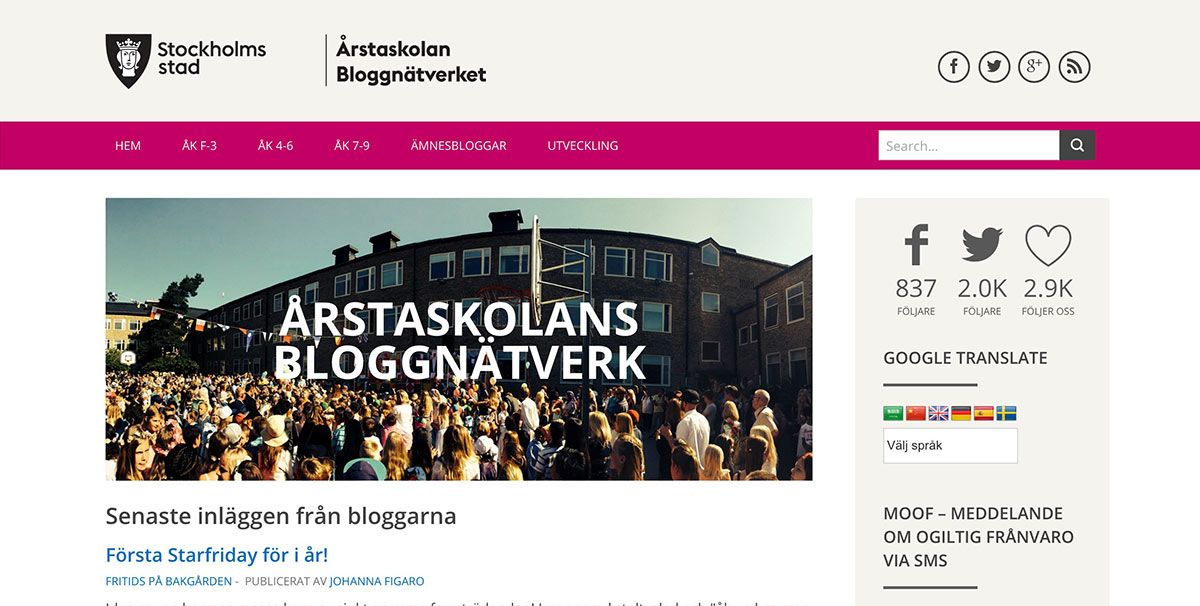 If you know me you know I run everything on WordPress. Årstaskolan’s blog portal is no exception and is built in WordPress as a multisite. The front page is an aggregation page where all posts from the entire network are shown and in the menu you can navigate to the individual blogs. All tips will be based on WordPress, but similar solutions probably exist for other publishing tools. Let’s go!
RSS
RSS — or really simple syndication as it stands for — is already built into WordPress. “RSS is a technology that allows users to subscribe to web feeds, that is, to be immediately notified when something new has been published on the web” — quoted from Wikipedia. By using, for example, an app or program you as a reader can subscribe to all kinds of websites and collect everything in one place. Below you can see the Reeder app that I have on my phone and tablet. Here I’ve subscribed to news from BuzzFeed and three blogs from Årstaskolan. As soon as something new appears I get a push notification and can read it. I don’t have to go to those sites to see if anything new has been posted. 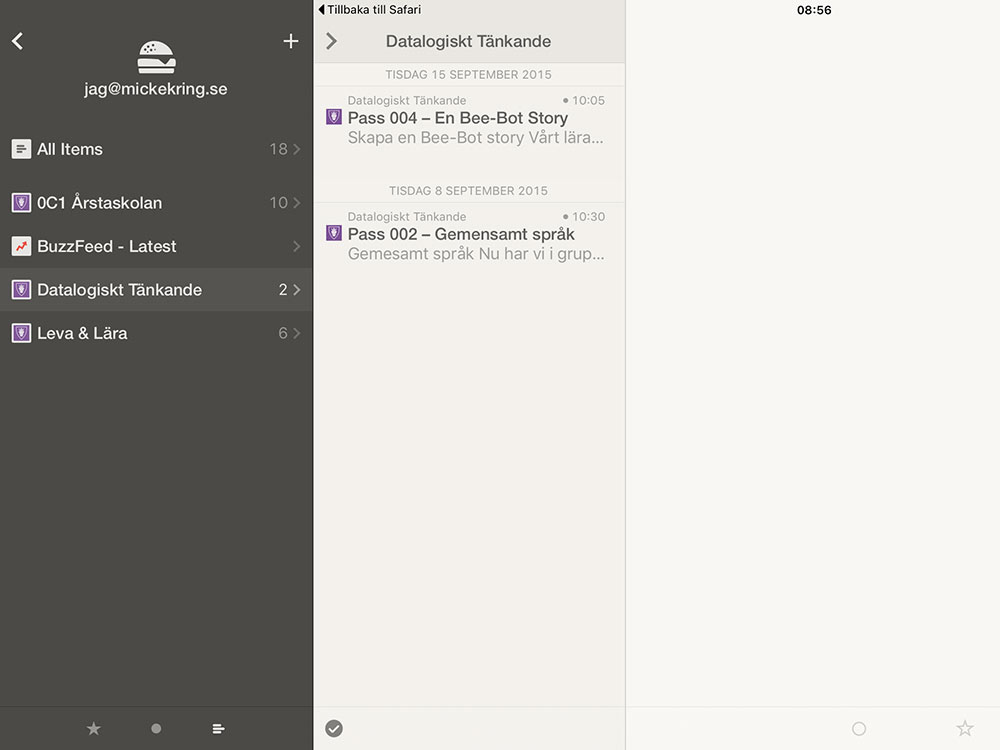 You get the address to your RSS feed in WordPress by adding /feed to your URL.
Example: The blog about computational thinking that has the address site.arstaskolan.se/datalogiskttankande has the RSS feed address site.arstaskolan.se/datalogiskttankande**/feed**
Do: Create a link to your RSS feed and put it in a text widget if your theme doesn’t support showing it. This icon stands for RSS and if you add the icon next to your widget you make it a bit clearer for your visitors.
Subscribe via email
One of the most popular services on Årstaskolan’s blog network is to get new posts sent to your email via subscription. At the time of writing we have about 1,300 subscribers to the school’s blogs and about 12,000 emails are sent to them per month. There are a host of services for WordPress to enable subscription to your posts and I’ll suggest two of these, JetPack and MailChimp. Both are free (MailChimp up to a certain level), but JetPack is much easier to get started with.
Jetpack
JetPack is basically a plugin for WordPress — created by Automattic — that contains lots of services. One of these is “subscriptions”. All you need to do is activate that feature after you’ve installed the plugin and add the widget to your site and it’s done. An email is sent to your subscribers as soon as you publish a post. On the minus side is that you have no control over the service. You cannot manually add or remove subscribers.
MailChimp
MailChimp is one of the largest services for sending newsletters. A whole range of plugins exist for WordPress so you can link the two services. It’s more work, but you can create your own templates for how your newsletter should look, add and remove users and see statistics on opened emails and more. In addition, I’ve set the emails to be sent to subscribers at 17:00 every day — I figure many are on their way home from work then — to get maximum reach. The email also contains an excerpt of the post so we can bring subscribers back to our site and not miss the chance for comments.
Facebook, Twitter
With JetPack (and other plugins) you can also set your posts to be published to, for example, a Facebook page or Twitter. When you’ve installed the JetPack plugin you can activate this function and connect the services.
Schedule posts
A simple feature many miss is that you can also schedule your posts in WordPress. For example, you could add lesson plans for a couple of weeks ahead as separate posts and choose when they should be published. So if you have an hour free and are already working on the lesson plans, make sure to post everything at once. The posts will then be published automatically at the time you specified.
Google Translate
To further make the information you want to share accessible, you can use translation services such as Google Translate. We use the plugin “Google Language Translator” which can be downloaded for free from wordpress.org. As you can see in the top image from the blog network there is a widget on the right side where the reader, with the press of a button, can have the text translated into several languages. Machine translations are by no means perfect, but it’s an appreciated feature on our blogs.
Text-to-speech
There are also web services to read your content aloud, where you get a small play button on your post. Since many devices today have some form of text reading I haven’t hunted around much for this type of service, which can also be quite expensive. If you have tips, please share them in the comments.
Next part - Text
In the next part we’ll look a bit at how to write easy-to-read posts and how we can think about the information we distribute.
The whole blog series

About the author
Micke Kring
I'm fascinated by what happens when people and technology meet. After nearly 30 years in education and development, I explore, prototype and teach AI with the same playful curiosity as when I first started out.