App project | Administrative app for school staff
 Micke Kring
·
Micke Kring
·
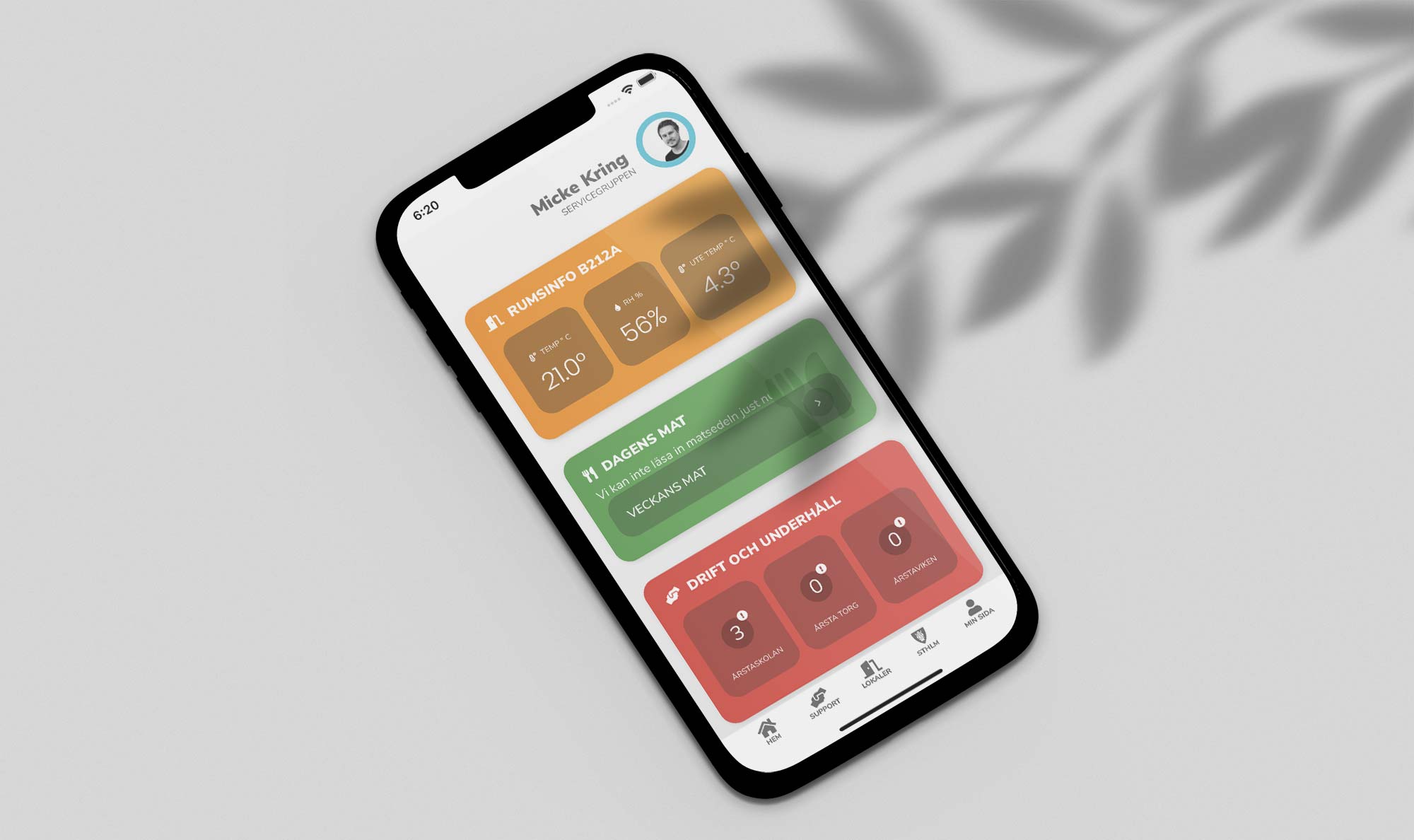
It’s time for me to admit that even this little app project is actually a project, so in this post I thought I’d document how it’s built and with what — in case anyone wants to try something similar. But let’s start from the beginning. To work on my own professional development I create small side projects where I force myself to learn a bunch of things I don’t know. Of course the projects must have real recipients and be ‘for real’. I find it hard to motivate myself to learn things for the sake of learning.
How this project came about I don’t quite remember, since I already have a main side project this term in the form of IoT-uppkopplat klassrum, which you can read more about here. But there has long been an idea to both merge a bunch of small services and websites into an app to make things easier for the staff — and also to enable pushing notifications if needed (which would have been incredibly handy a week ago, when our IT provider pushed out a faulty driver that blue-screened computers if they were restarted (which many were)).

The first three screens in the app - Home, Support and Rooms
One ring to rule them all
A problem as I see it is that we have quite a few services and websites with their own addresses that staff are supposed to remember.
Sure, they’re described in different staff documents, but who has the energy to read that? It becomes very scattered and doesn’t make it easy for the staff. A poor IT environment, in short. So what I wanted to do was gather all this under one roof and also be able to send push notifications in an easy way. What the app currently collects and presents includes, among other things, the following;
- Room information in ‘your room’ (my IoT project) | Source: external website (by me)
- Lunch menu | Source: external service (skolmaten.se)
- Operations and maintenance | Source: local in the app
- Local public transport | Source: external website and API (Trafiklab)
- Local and aggregated news | Source: local in the app and various sources via RSS
- Quick polls - simple surveys | Source: local in the app
- Support site - cheat sheets and videos | Source: external website (by me)
- Helpdesk | Source: external service (Freshworks)
- Room booking | Source: external website (by me)
- Room schedule | Source: external website (by me)
- Absence reporting | Source: 5 different external websites
- City services | Source: a bunch of external websites
Of course there are more things I’d like to integrate, but unfortunately most of the city’s services are completely locked down. However, I hope to soon be able to add room schedules for all rooms at the school. In addition, all information is tailored to the user. Depending on the role you have in the app, you only see the content relevant to you. It’s all about scaling away as much as possible.
The foundation - WordPress, SuperView and OneSignal
The app is not a ‘real app’ built from scratch, but a kind of hybrid app. All content is web-based and runs through a WordPress site. So, apart from the menu at the bottom of the app, everything you see is WordPress. The site is embedded in a web viewer app — SuperView in my case — although there are a number available to buy.

When you’ve bought the webviewer app, you open it in Xcode and change the few parameters there are to change — like the URL to the page you want to show, whether you want to use menus and similar, and whether you want to run ads. Of course you can change colors, add your splash screen, icon and a bit more. You also add the details for the push notification service you use. In my case I use OneSignal, which is free up to 30,000 subscribers.
OneSignal can also be used for web notifications, which I use on this site. When it comes to WordPress, the most important thing is that you choose (or build) a theme that looks good on mobile or tablet. Most themes do that these days.
In my case I have restyled the theme almost entirely with CSS, so I chose a simple and fast theme. Of course you should run it self-hosted and with SSL (https).
Important to know regarding this type of hybrid apps is that, just like with native ones, there’s no guarantee they’ll pass Apple’s approval process. However, I have released another app for the school using exactly this method — Hearly (an audiobook app with audiobooks by the students) — and it went through without problems. Be sure to do a quick Google search for tips on how to get your app approved. Right now I’m distributing this app via Apple’s TestFlight for beta testing.
Of course an Android version will come when I release it. It’s much easier to get Android apps approved, so that won’t be a problem.
What does this cost?
It’s obviously hard to calculate the total cost of this app, but let’s try to add up what we know. The biggest part is of course work time. The rest are small potatoes.
- WordPress | Free
- WordPress theme | Free
- Webviewer app | ~200 SEK x 2 (iOS + Android) = 400 SEK
- OneSignal | Free
- Apple developer | ~1000 SEK / year
- Google developer | ~250 SEK one-time fee
- Server cost | a couple of tens per month - let’s say 50 SEK / month
- Total: Approximately 650 SEK in a one-time cost and then approximately 1,600 SEK per year.
Edit 2019-11-06 - Version 0.7.0 submitted for review for beta testing
In the video below you’ll get a short walkthrough of how the app looks now in its infancy. The hope now is to get it approved for beta testing, so we can see if the staff find it helpful.
Questions?
If you have any questions, as usual just ask them in the comment field below or in any forum.

About the author
Micke Kring
I'm fascinated by what happens when people and technology meet. After nearly 30 years in education and development, I explore, prototype and teach AI with the same playful curiosity as when I first started out.